
This article was created with the AI assistant Claude and published by Peter Hoenig.
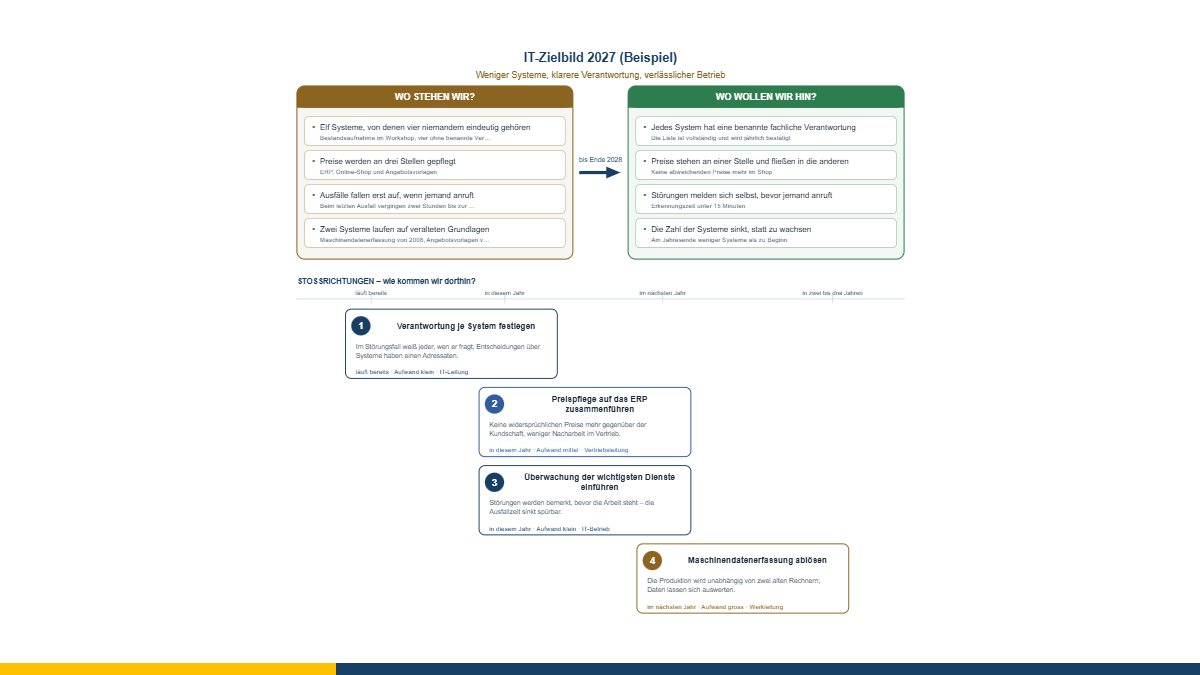
After a stocktake of the IT, the same task nearly always follows: the result has to go to the management team. And there one rule applies that is not open to negotiation – it is one page, and it will be read in five minutes.
That is what the architecture target picture is for. It is deliberately the smallest tool in this series.
Phrase it as a state, not as a project
The commonest mistake in the right-hand column: it contains projects. “Clarify responsibilities”, “migrate to a new platform”, “harmonise interfaces”. Those are activities, and activities can be carried on indefinitely without anything changing.
A goal is a state: “Every system has a named business owner.” “Prices live in one place and flow to the others.” “Faults report themselves before anyone rings.” Each of them comes with the question: how do we know we are there? The tool asks for it.
The benefit is the currency
A thrust with no benefit is not negotiable in a management team – it is weighed against something that has one. “Migrate to a new platform” is a project name. “Production becomes independent of two ageing machines, and the data can finally be analysed” is a benefit.
The benefit belongs in the language of the business, not of IT. “Less technical debt” is not a benefit but a description of the problem in jargon.
Just as important is the first step: what happens in the next few weeks? Without it the target picture stays a declaration of intent that everyone agrees with because it costs nothing.
Why no more than five
The tool warns from six thrusts on, and that is not a formality. A target picture with eight items is not a target picture but a programme – and the attention of a management team spreads so thin that no thrust is carried any more. The honest question is: which three really count?
The thrusts arrange themselves in the picture by their time frame, incidentally. If nothing sits under “already running” and “this year”, you see it at once – and you know that this target picture will have no consequences.
Where the content comes from
Two routes fill the left-hand column without anyone typing:
- The findings from the IT map: how many systems there are, how many are critical or need replacing, how many are more than ten years old, for how many no ownership is named – each with evidence. You then rewrite them in your own words; the raw form is a starting point, not a text for a management team.
- Initiatives from the 8EM modeller become thrusts. Usually there are too many; the cutting down is the real work.
The other way round, the thrusts go back to the modeller as a table (level 7b, initiatives), where they can be prioritised and put into a roadmap. And a single thrust can be handed over to project management as a project brief – a banner “create as a project” appears there.
For the meeting
The export produces the picture as a PDF (A4 or A3 landscape), as PowerPoint and as an Impress file – there as individual, editable shapes, so you can move the slide into your own template. The report alongside holds everything that does not fit on the slide: evidence, explanations, first steps.
The target picture is free of charge and available as free software under the GPL: open the architecture target picture. If you would like to turn a stocktake into a decision paper, I am happy to help – get in touch for a free initial consultation.
Open or download the tools
- IT map in 30 minutesOpen Download (432 KB)
- 8EM modellerOpen Download (3.3 MB)
- Project managementOpen Download (958 KB)
- Architecture target picture on one pageOpen Download (436 KB)
Thinking further
You can find more on this topic under enterprise architecture management consulting – or talk to me directly in a free initial consultation.
Comments
Comments are published immediately with your name. Only the name, title, comment text and time are stored – see the privacy policy.
Loading comments …