
This article was created with the AI assistant Claude and published by Peter Hoenig.
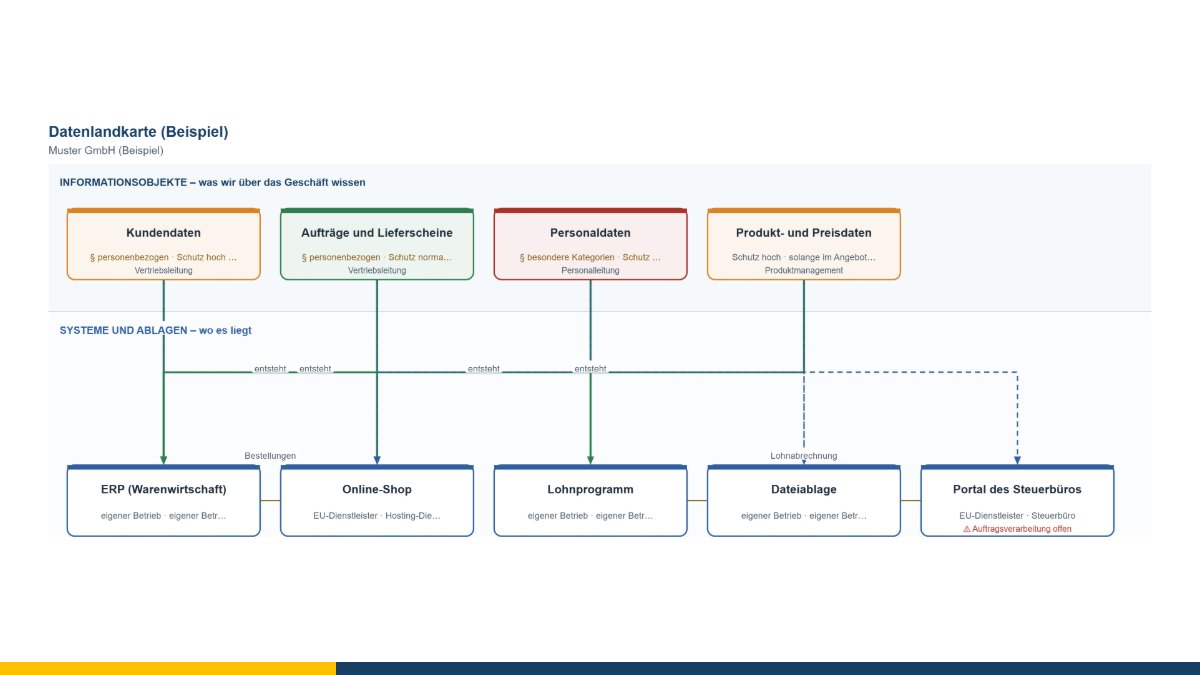
Two very different occasions lead to the same question. One is replacing a system: what actually happens to the data inside the old program? The other is a data protection question: where exactly do our personnel records live?
Both times the first task is the same – write down what information there is, where it lives and who owns it. That is what the data map is for.
Business ownership, not IT
The most important field on the map is an inconspicuous one: business owner. What is meant is a role in the business – sales management for customer data, HR management for personnel data – not IT.
The reason is simple: if nobody from the business is named, operations ends up deciding how long data is kept, who gets access to it and where it is copied. Not out of presumption, but because somebody has to decide. Those decisions belong where the consequences can be judged.
Protection needs, twice
The map asks separately about confidentiality and availability. That is not formalism; it leads to entirely different measures. Pricing data is often highly confidential and highly availability-critical at the same time. Personnel data is very confidential, but a day without access rarely hurts. A single “high protection need” blurs that difference – and leads to doing the same thing everywhere.
Paper and spreadsheets belong in it
The lower level is deliberately called “systems and filing places”. In small and medium-sized companies a considerable part of the important information does not live in a system: in a spreadsheet on a desktop machine, in a folder in a cupboard, in a mailbox. Leave that out and you draw a tidy map that does not describe reality – and that misleads you at the next system replacement.
What the map points out
The tool looks for the gaps that experience shows get expensive:
- An information object that lives in no system. Then either a system is missing or the object is not one.
- Personal data with no retention period. “How long may and must this be kept?” is rarely quick to answer, but it has to be asked.
- Personal data with no legal basis.
- A provider with no processing agreement noted.
- Personal data on systems outside the EU. That is permissible, but it needs a basis – and should not be overlooked.
The input – and what it is not
The connection produces a table with the personal-data objects and everything this map holds about them. Two columns are deliberately left empty: the categories of data subjects and the purpose of processing. Both belong in a record of processing activities under Art. 30 GDPR but are not collected here.
That is intentional, not an omission. A data map is a working basis from a workshop. It replaces neither the record nor a data protection assessment, and it is not legal advice. What it does: it makes visible what has to be decided, and it supplies half the groundwork.
Connections
From the 8EM modeller come data objects with their protection needs and personal-data flags as well as the IT systems; from the IT map the systems recorded there. The map goes out as a table in the same direction – the information objects land in the modeller’s data level, where they can be linked to processes, systems and interfaces.
The data map is free of charge and available as free software under the GPL: open the data map. If a system replacement or a data protection stocktake is ahead of you, I am happy to help with the groundwork – get in touch for a free initial consultation.
Open or download the tools
- 8EM modellerOpen Download (3.3 MB)
- IT map in 30 minutesOpen Download (432 KB)
- Data map (information objects and their systems)Open Download (440 KB)
Thinking further
You can find more on this topic under enterprise architecture management consulting – or talk to me directly in a free initial consultation.
Comments
Comments are published immediately with your name. Only the name, title, comment text and time are stored – see the privacy policy.
Loading comments …