
This article was created with the AI assistant Claude and published by Peter Hoenig.
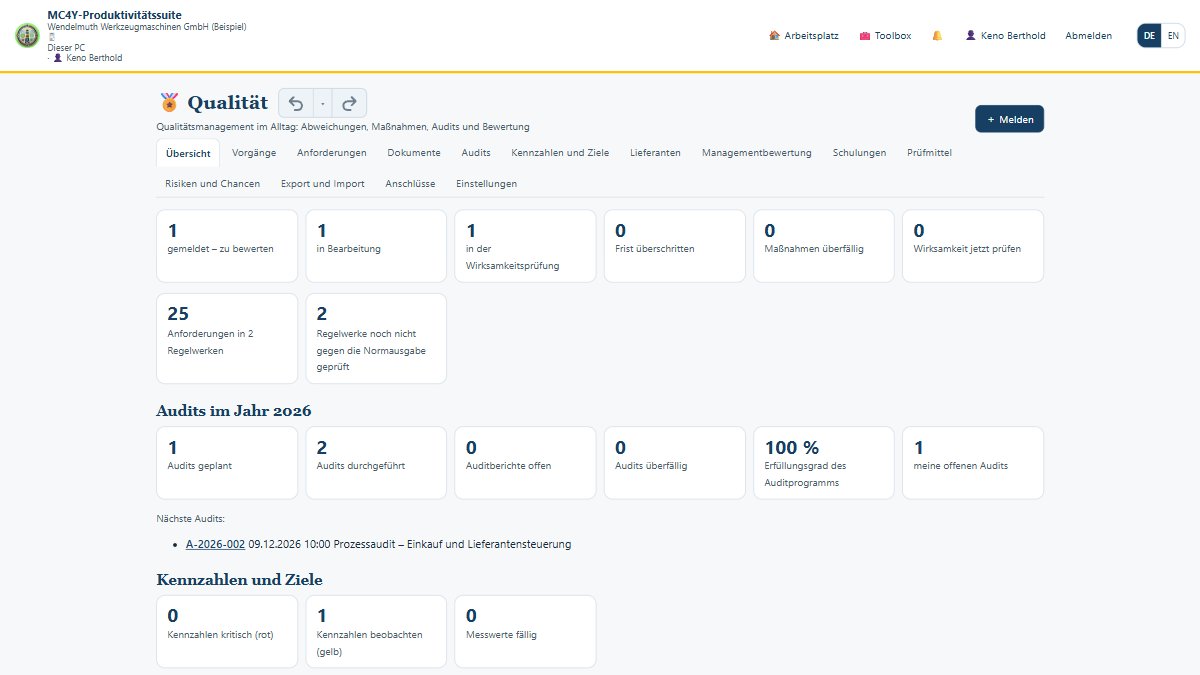
A management system does not live in the manual on the shelf but in everyday work: someone notices a nonconformity, a customer complains, an audit is due, a measuring instrument needs its inspection, a qualification expires. In many small and medium-sized businesses this is spread across spreadsheets, e-mails and folders – and before the next audit everything has to be gathered laboriously. With the new “Quality” module of the MC4Y Productivity Suite you run this everyday work where your tasks, appointments and documents already are. The module keeps nothing twice: measures become tasks, audits become appointments, reports become documents in the library.
Trial version: the module is thoroughly tested with its own test benches, but not yet proven in the daily work of many businesses; it is therefore not selected in the installer by default. Overview and frequently asked questions are also on the page Quality management with the MC4Y Suite.
The suite helps to organise and to provide evidence; whether a management system meets the requirements of a standard is judged by auditors and accredited certification bodies.
What does the module include?
In the toolbox the module is listed under Business Support Tools as “🏅 Quality (QM)”. It has fourteen tabs: Overview, Cases, Requirements, Documents (overview of controlled documents), Audits, Indicators and objectives, Suppliers, Management review, Training, Test equipment, Risks and opportunities, Export and import, Connections and Settings (with retention and deletion periods). Who sees which tab is governed by the suite's rights – per area in three levels. Whoever is involved in an entry, for example as the person responsible for a measure or as an auditor, edits “their” entry even with read access. Everyone with a right in the module may report.
How does a case run – from the report to effectiveness?
A case bundles everything about a problem or an improvement: a nonconformity, a complaint from a customer or to a supplier, an improvement suggestion or an observation from an audit. It receives a number such as Q-2026-004 and runs through fixed steps: reported, in progress, effectiveness check, closed. The QM team accepts the report and sets the responsible person, deadline and severity. Then come the immediate action, the cause – if you like, directly as a why-chain in the case – and the measures. Every measure becomes a task in the Tasks module; whoever completes it there also completes it in the case.
Only when all measures are done and it is clear how the effect is to be shown does the case go to the effectiveness check. On the check date the reviewer receives a task. “Not effective” starts a new round, “effective” clears the way to completion – under the four-eyes principle by someone who was responsible neither for the case nor for one of its measures. A completed case is read-only; “Reopen” only works with a reason, and the history records who did what and when.
How do I plan and carry out internal audits?
The audit programme of a year consists of lines: what is audited (a process, a unit, a location, a supplier), against which criteria, by whom and how often? You set the rhythm as in the calendar – for example “every three months on the first Monday”. “Create appointments” turns it into one appointment per audit in the calendar, with auditors and auditees as participants. An audit can be moved without touching the others. When planning, the module warns if an auditor would audit their own area or if a requirement is not covered in the year.
On site you answer the checklist question by question – on a phone or tablet as well: fulfilled, finding or not checked, plus note, evidence and photo. Two templates in our own words are included, “General process questions” and “Supplier audit (basic questions)” – no checklist of standard clauses. On completion, notes and nonconformities automatically become cases. The audit report is created as a Word file in German or English and goes into the document library as a draft; a second person approves it.
What does the management review collect?
Once a year – or as often as you like – top management reviews the management system. The module enters the appointment in the calendar and collects the inputs instead of someone typing them: implementation of the decisions of the last review, cases by source and type, complaints, indicators with traffic light, supplier evaluations, audits, training, test equipment and risks and opportunities. These figures are frozen at the reference date. Sections in your own words and decisions are added; the decisions land as tasks with the people responsible. The minutes go into the library as a Word file; top management approves them.
Indicators, suppliers, training, test equipment
- Indicators: measurements entered manually or from a CSV file, plus automatic indicators from the module – such as complaints per month, the share of actions completed on time or the lead time of cases. The traffic light always shows a symbol and text, never only colour. If an indicator is red, the module suggests a case – it is only created when you click.
- Suppliers: these are the organisations in the master data; there is no second supplier register. One or more people give scores per criterion, the module calculates a weighted result and a rating. Criteria, weights and thresholds are a suggestion you adapt.
- Training and qualifications: a matrix shows who needs which qualification and when a record expires. Attendance at a planned training creates the records. The reminder of an expiry is a private task – personnel data is seen only by those who need to see it.
- Test equipment: inspection interval, next inspection, task and deadline in the calendar; a failed inspection blocks the equipment.
- Risks and opportunities of the management system with a matrix of probability and impact – IT risks stay in the 8EM Modeller, project risks in project management.
Why no standard texts?
The texts and clause titles of standards are protected by copyright. The module therefore contains only the clause numbers with our own short description in my words – just as the 8EM Modeller already does with the numbers of Annex A of ISO/IEC 27001. The wording is available from the national standards body; you enter your own interpretation under “Own text”. Because standards are revised, the module reminds you to check the numbers against your current edition. You create frameworks of your own – a company standard, a customer specification – in the same way.
Controlled documents and recurring tasks
With the same version of the suite, wiki spaces and libraries of the document library can be controlled: draft, review and approval, optionally with the four-eyes principle; readers always see the approved version. In addition there are page templates such as the procedure, a read confirmation and tasks that repeat. I describe these extensions in the articles on the wiki, the document library and the tasks. Controlled documents appear in the QM module in the coverage of the requirements and in the management review.
What is tested – and what is not?
I tested on test copies of the suite: 955 automatic checks on the interface and the operation of every part in Edge and WebKit (Safari's engine), in phone format with simulated touch and with the English interface – most recently 57 operating runs without errors, all parts in one installation. Not yet tested are a real Mac, real phones and device cameras, Linux and Windows Server, the web servers IIS, Apache and nginx, and e-mail notifications. Also built are audits without a network connection, export and import of the whole QM data set and the connections to the 8EM Modeller (quality objectives and processes, actual value and traffic light back), the Customer Navigator (complaints, status of the case back on the request) and the analysis tools Five whys, Cause and effect and Incident timeline (“Analyse cause in a tool”, the result comes into the case after confirmation) – both sides with the same version, tested on the real path from the tool through the suite into QM and back, in Edge and WebKit, in German and English, also in phone format. Without these tools, enter the quality objective and the cause as text.
Data protection and co-determination
The module stores everything in a separate database of the suite at the operator; it is part of the daily backup. Nothing goes to third-party services, and merely opening it stores nothing in the browser. Personal data are above all names of people responsible, auditors and reporters, photos from audits and – for training – qualification records of employees. The module does not assess people and builds no rankings; the forms remind you to describe processes, not people. Whether the introduction is subject to co-determination and which retention periods apply is for the operator to clarify – this is not legal advice. The periods are pre-filled per type with professionally reasoned suggested values (evidence of the management system ten years, training sessions and expired qualification records as personal data three years); the operator checks and changes them, and where retention obligations may apply the module advises clarifying this with a tax adviser or legal adviser. A deletion run never starts by itself: it shows the expired entries and moves them to the recycle bin only after confirmation. More in the privacy policy.
Frequently asked questions
Is the “Quality” module a certification?
No. The suite helps to organise and to provide evidence; whether a management system meets the requirements of a standard is judged by auditors and accredited certification bodies.Does the suite contain the texts of ISO 9001 or ISO/IEC 27001?
No. It contains only clause numbers with our own short descriptions, no standard texts and no clause titles. The wording is available from the national standards body; you enter your interpretation yourself.Does MY COACHING FOR YOU offer the suite or a certification?
No. I provide the source code under GPL-3.0-or-later, like the rest of the suite. Whoever installs it operates it and is responsible for the data; certification is carried out by accredited bodies.Can I carry out an audit on a phone?
Yes, in the browser of the phone or tablet with a connection to the suite: question by question, with note, evidence and photo. It also works without a network: “Reserve for offline use”, record on site, reconcile when back online – you decide any conflicts yourself.Are employees assessed with it?
No. There is no evaluation per person and no ranking; the qualification matrix serves to plan trainings. Whether the introduction is subject to co-determination is for the operator to check.Do I need the whole suite for it?
The module is part of the MC4Y Suite portal and is not selected in the installer by default. It is most useful together with the Tasks, Calendar and Document library modules; without Tasks, measures are kept in QM only, without reminders.I name “ISO” and designations such as ISO 9001 or ISO/IEC 27001 only descriptively, to refer to the respective standard; there is no connection to the standards organisations.
Thinking further
You can find more on this topic under resources and downloads – or talk to me directly in a free initial consultation.
Comments
Comments are published immediately with your name. Only the name, title, comment text and time are stored – see the privacy policy.
Loading comments …