
This article was created with the AI assistant Claude and published by Peter Hoenig.
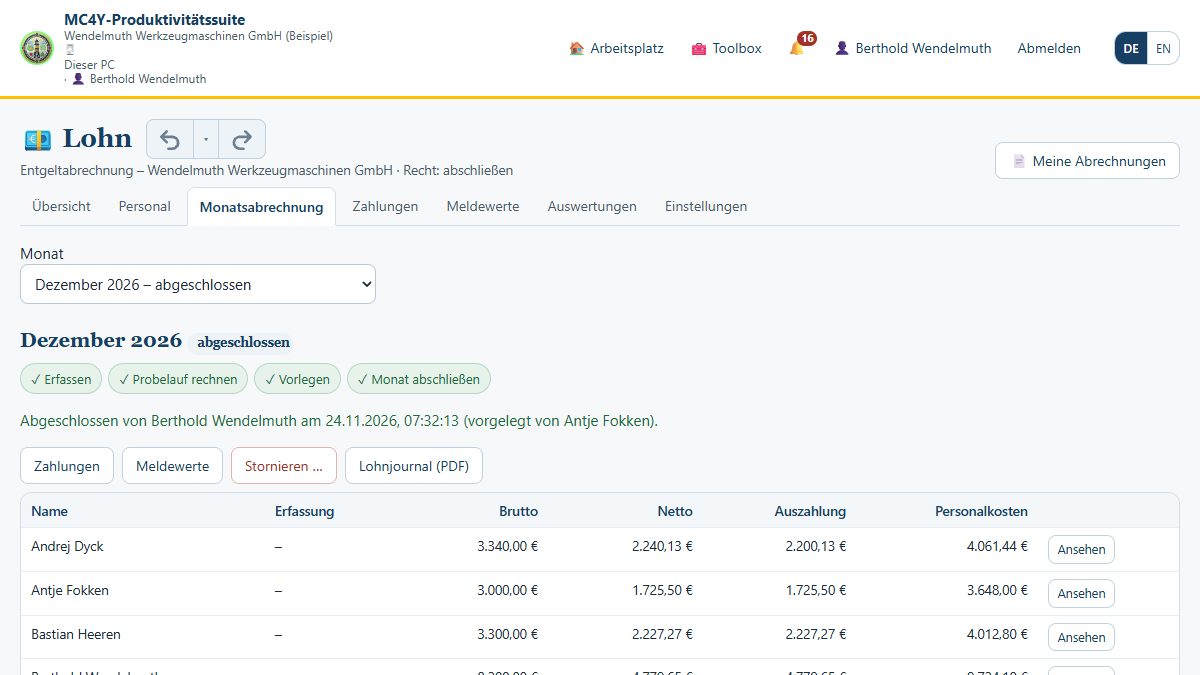
At the end of every month small businesses go through the same routine: collecting hours, adding allowances, producing payslips, contributions to the health insurance funds, wage tax to the tax office, transfers to the employees, bookings for accounting. Many outsource all of it, others use programs whose data sits with a third-party provider. For businesses that want to run their payroll themselves and on their own server, the MC4Y Productivity Suite now has the Payroll module. It is written for German payroll law (wage tax, social security, statutory reports in Germany). It is still being trialled – please cross-check payslips before payment.
How does a payroll month work?
You create the month and enter for each person what has changed: hours for hourly pay, allowances, one-off payments, absences. The module can suggest the hours from the time bookings in your projects – they are only taken over once you confirm them. The trial run calculates everyone. If one person has an error, for example a missing detail, the others are still calculated; the error is shown in that person’s row. The comparison with the previous month highlights what is new, what has dropped out and what differs by more than five per cent.
Only when everything fits is the month closed. If the four-eyes principle is switched on, one person submits the month and another person finalises it. After that the month cannot be changed: the payslips appear for the employees under “My payslips”, the bookings go to accounting and the deadlines become tasks. Corrections are made in the following month; only the most recently closed month can be cancelled, with a reason, as long as no payment has been marked as paid.
Where do wage tax and contributions come from?
The calculation uses its own calculation core. Wage tax follows the official program flowchart (PAP) of the German Federal Ministry of Finance, which is published as XML and translated automatically – not re-programmed by hand. Added to this are the solidarity surcharge, church tax and the contributions to health, long-term care, pension and unemployment insurance including the levies. Every value is stored in the module with its source, reference and the date it was read. If a value is missing, the core does not estimate; it reports which value is missing.
The core is tested against the test tables of the Federal Ministry of Finance and against official social security calculation examples – 5,134 test cases in total, each calculated in the browser and on the server, and both results must be identical.
What happens with 2027 while not everything is official?
For 2027 some values have so far only been published as drafts, above all the wage tax program flowchart (draft of 8 October 2026) and part of the social security computation values. Instead of refusing to calculate, the module uses the draft values and marks everything as provisional: the trial run, the payslip with the banner “PROVISIONAL”, the payroll journal and the reporting values. You can only close a provisional month with a second, explicit confirmation.
As soon as the official values are available, the module shows the months concerned. It recalculates them with the same inputs, shows the difference for each person and settles it in the open following month – as a separate line on the payslip and in the wage tax return. The closed months themselves remain unchanged.
What do the health insurance funds and the tax office receive – and how?
The suite does not send any reports. It prepares the values field by field: contribution statement per health insurance fund, wage tax return, registrations and deregistrations, annual notifications, wage tax certificates and, for company pensions, the paying agency values. You transfer them via the official channels – the health insurance funds’ reporting portal and Mein ELSTER – and tick them off in the module. Every deadline becomes a task in the suite, due on the deadline.
How do salaries and bookings reach the accounts?
For net pay, social security and wage tax the module creates SEPA transfer files to import into online banking. With the four-eyes principle a second person releases each file. When a month is closed, accounting receives the bookings per cost centre according to SKR03 or SKR04 – totals, no individual salaries – and, once executed, the payments.
What is already in the master data?
Name, address, personnel number, cost centre and bank details are maintained once in the master data; the health insurance funds are organisations of the type “health insurance fund” there. The actual payroll details – tax class, social security number, contribution groups, pay – are kept only in the payroll module and never in the master data connection of other tools. Company pensioners are people in a unit of the type “retirees”. The bookings arrive in accounting as a handover “From payroll”.
Functions at a glance
- Setup assistant with business, health insurance funds, chart of accounts and recovery key.
- Import payroll details from a table (CSV or Excel): assign columns, check every row – errors with row and column –, apply in one step that can be undone.
- Starting during the year: previous values of the year from the previous payroll system for each person, so that one-off payments, the payroll account and the wage tax certificate are right.
- Payroll details with “valid from”; earlier versions are kept.
- Pay types with tax and contribution treatment, fixed additions and deductions per person.
- Trial run, comparison with the previous month, four-eyes closing, cancellation, correction in the following month.
- Payslip as PDF and print view in German and English, “My payslips” for every person.
- Payroll journal, payroll account, employment cost per cost centre or organisational unit (CSV and PDF).
- Reporting values with a copy button, deadlines as tasks, SEPA files, booking handover.
- Undo and redo for entries, payroll details, imports, pay types and settings.
- On a phone for viewing only – payroll is run at the desk.
Frequently asked questions
Does the module replace my tax adviser?
No. The module is not tax or legal advice and is still being trialled. Please check the setup, pay types and annual values with your tax adviser; please cross-check payslips before payment.
Does the suite send reports to the health insurance funds or the tax office?
No. It prepares the values; you transfer them yourself via the official channels.
What if the official values for 2027 still change?
Then the module shows the months calculated provisionally, recalculates them and settles the difference in the following month.
Who can see the payroll data?
Only people with the “Payroll” permission at the levels read, process payroll or finalise; every access is logged. Employees only see their own payslips.
What happens when the server is replaced?
The payroll data is encrypted, and the key is deliberately not part of the backup. With the recovery key from the setup assistant the data can be read again after the move – keep it separate from the server.
What does the module not calculate?
Among other things short-time work, partial retirement, garnishments, multiple employment, mini-jobs in private households and company pensions from pension funds or direct insurance. The module reports such cases instead of calculating them wrongly.
Your data stays with you
The payroll module runs only in the MC4Y Productivity Suite on your own server; the payroll data is stored there encrypted, and nothing goes to me or to third parties. The page Payroll for small businesses gives an overview with the key questions. How to set it up and run payroll month by month is described step by step in the user manual; installing the suite is covered in the installation guide. If you would also like to organise processes, roles and IT systems in your business, I will be glad to support you with IT-supported organisational consulting – get in touch for a free initial consultation.
Thinking further
You can find more on this topic under resources and downloads – or talk to me directly in a free initial consultation.
Comments
Comments are published immediately with your name. Only the name, title, comment text and time are stored – see the privacy policy.
Loading comments …