
This article was created with the AI assistant Claude and published by Peter Hoenig.
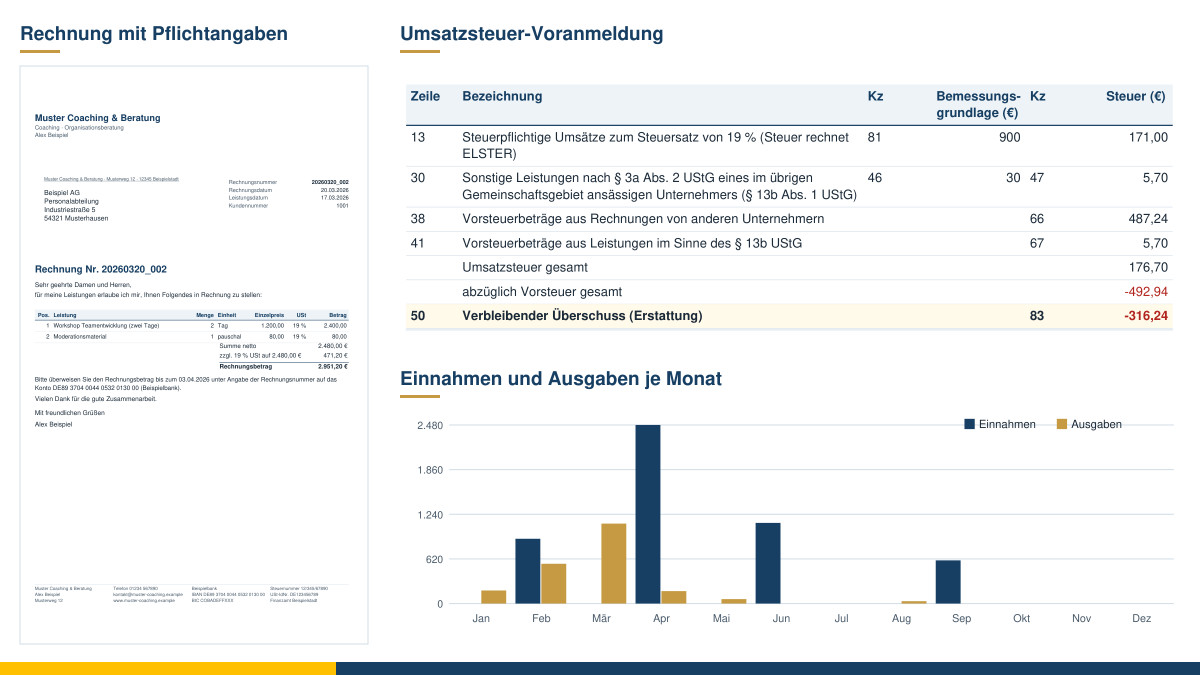
Every quarter, the same routine: gathering receipts from e-mails, downloads and piles of paper, copying amounts into a spreadsheet, adding up the input VAT, entering the totals in ELSTER, the German tax authorities' online portal – and hoping that nothing is missing and nothing has been entered twice. For a long time, that is how I kept my own books, using Excel lists. Many self-employed people and small businesses probably find themselves in a similar situation. That is why I have built a tool that brings together the whole path from receipt to advance VAT return (Umsatzsteuer-Voranmeldung) – in the browser, without a subscription and without your data leaving your computer.
At a glance
- Recording receipts: with tax rate, input VAT, payment date and receipt file – including e-invoices in XRechnung or ZUGFeRD format.
- Writing and sending invoices: with a check of the mandatory details, sequential number, PDF and e-invoice – also taken over from the project management tool, with a statement of services as an attachment.
- Reconciling bank statements: import transactions from online banking and match them to open invoices and receipts.
- Working with sales and customer care: take over new customers from the Vertriebs-Navigator, my sales tool; provide the Kunden-Navigator, my customer care tool, with revenue and open items per customer; take over services recorded there as draft invoices, and incoming invoices from service providers, file included, as receipts.
- Determining profit: as a cash-basis income statement (Einnahmenüberschussrechnung, EÜR) or, optionally, with double-entry bookkeeping.
- Recording private items separately: tax-relevant private expenses for the income tax return.
- Reports as PDF: advance VAT return, Annex EÜR, fixed asset register and more.
- Filling-in aids: an ELSTER file for the advance VAT return and a list of values for the tax return in the order of the forms.
- Handover to your tax adviser: posting batches in DATEV format and a complete data package.
- Proper records under the GoBD (the German principles for keeping books and records in electronic form): change log, locking, cancellation instead of deletion, automatic backups.
- Free and local: free of charge, free software, your data stays on your device.
Recording receipts – with tax in mind
A receipt is quickly recorded: date, receipt type, seller, invoice number, amount and tax rate. You simply drag the receipt file – PDF, photo or scan – into the window. The tool files it in your document store under a consistent name, for example with receipt number, date, receipt type and seller. You can define your own naming pattern.
What matters is the tax case: if German VAT is shown on the invoice, it can usually be deducted as input VAT. If the invoice comes from a business in another EU country without VAT, you owe the tax yourself and deduct it as input VAT at the same time (reverse charge, Section 13b of the German VAT Act, UStG) – this often applies to software and cloud services. Foreign VAT, on the other hand, is not input VAT in the German procedure. It is precisely these cases that easily lead to errors in self-kept lists. The tool therefore points out, among other things, when
- a tax rate is not a German rate,
- a foreign provider charges German VAT – often a sign that it treats you as a private customer,
- an invoice over €250 has no invoice number,
- a receipt may have been recorded twice,
- a business entertainment receipt lacks the occasion and the participants.
For purchases such as computers, software or office furniture, the tool decides on the basis of the amount: up to €250 net, they are deducted immediately as a business expense; up to €800, they are treated as a low-value asset; above that, they are depreciated over their useful life. The special rules for business entertainment (70% deductible) and gifts (limit of €50 per recipient and year) are also built in. Existing Excel or CSV lists can be imported.
E-invoices in XRechnung or ZUGFeRD format are also simply dragged into the window. The tool displays them in readable form, suggests the receipt and keeps the original file – with an e-invoice, the XML file is the original.
Writing invoices – including as e-invoices
When you write an invoice, the tool checks the mandatory details under Section 14(4) of the German VAT Act: name and address of both parties, tax number or VAT identification number, invoice date, sequential number, type and scope of the service, date of supply, net amount, tax rate and tax amount – or the necessary note instead, for example that the recipient of the service is liable for the tax (reverse charge) in the case of customers in other EU countries.
As long as the invoice is a draft, it can be edited freely. Only when it is issued does it receive its sequential number and become locked. The tool saves it as a PDF in letter format and as an e-invoice in XRechnung format. An issued invoice can no longer be changed; corrections are made with a cancellation invoice and a new invoice. You record incoming payments with date and amount – or take them over from the bank statement. The overview shows open and overdue invoices. If you maintain customers and contact persons centrally in the master data tool, you can take over invoice recipients and their addresses from there – provided you switch on the master data connection in the accounting tool.
To send invoices, the accounting tool passes the PDF and e-invoice to your e-mail program, where the browser offers this. Otherwise, it prepares the e-mail with recipient, subject and text and has both files ready for attaching. The dispatch is noted on the invoice.
The most convenient way to put together invoices for projects is in the project management tool: working hours, materials, third-party services as well as licences, maintenance and operation, with an attachment that documents every hour and every expense. One click passes the invoice to the accounting tool. There you take it over as a draft, check it and issue it. In the PDF, the items are listed with subtotals per type of service, and the attachment follows on separate pages. The accounting tool reports the number, dispatch and receipt of payment back to the project.
The accounting tool also works together with my tools for sales and customer care. If you win a new customer in the Vertriebs-Navigator, you take them over with one click; the customer number goes back to sales. If you look after your existing customers in the Kunden-Navigator, the accounting tool can, if you wish, provide it with revenue, open invoices and payment behaviour for each customer. Services you record there arrive as drafts, just like project invoices; status, number and payment are reported back. You also manage the contracts with your own service providers in the Kunden-Navigator: an incoming invoice that you have filed there or taken over from an e-mail arrives, with file, invoice number, date and amount, at the top of the “Receipts” tab. You choose the receipt type and tax case – the receipt type of the last receipt from the same supplier is suggested – and save; with e-invoices, the accounting tool reads the details itself. The Kunden-Navigator then sees the receipt number, the payment and the expenses per service provider. Invoices, receipts, numbers and payments are only ever created in the accounting tool.
For context: in Germany, businesses have had to be able to receive e-invoices since 2025. Transitional periods apply to sending them to other businesses; from 2028, the e-invoice is generally mandatory between domestic businesses. Exceptions include small-amount invoices of up to €250 and invoices from small businesses (Section 19 UStG); invoices to private individuals are not affected. Before you send your first e-invoices, I recommend checking them with a validation tool, for example the validator of the Koordinierungsstelle für IT-Standards (KoSIT, the German coordination office for IT standards).
Reconciling bank statements – keeping an eye on open items
What often takes the most time is reconciling with the bank account: which invoice has been paid? Which debit still has no receipt? For this, you download the transactions of your business account from online banking – as a CSV file or in CAMT format, which most banks offer as a “bank statement as XML” (Kontoauszug als XML) – and drag the file into the window. The usual formats are recognised by their column headings; if a bank supplies an unfamiliar format, you assign the columns yourself once. The tool recognises transactions that have already been imported and skips them.
It then suggests a match for each transaction:
- Incoming payments are matched to open invoices – via the invoice number in the payment reference, the outstanding amount and the customer's name. Partial payments are possible.
- Debits are matched to receipts that are still recorded as unpaid.
- Payments already recorded are recognised and simply linked; the payment date is set to the bank's booking date.
- New receipts: for transactions without a counterpart, it suggests a receipt type, for example from earlier payments to the same payee, and creates the receipt with one click if you wish. You then compare the tax rate and amount with the invoice and attach the invoice as a file – a bank statement does not replace an invoice for deducting input VAT.
- Private drawings and capital contributions, as well as transactions that do not need a receipt, are marked accordingly.
Clear suggestions are highlighted in green, uncertain ones in yellow. One click accepts all suggestions; a click on the undo arrow reverses them. Reconciliation is doubly worthwhile with the cash basis of VAT (Ist-Versteuerung) and in the cash-basis income statement, because there the date on which the money actually changed hands is what counts.
The advance VAT return as a filling-in aid
For each month, each quarter or the whole year, the tool compiles the figures of the advance VAT return – according to the official 2026 form, with line and box number (Kennzahl), just as you enter them in ELSTER. Below them are the receipts for each box, so every figure remains traceable. Among other things, the following are taken into account:
- Cash or accrual basis of VAT (Ist- or Soll-Versteuerung): with the cash basis, the VAT from your invoices counts in the period in which the payment is received; with the accrual basis, in the period in which the service is performed.
- Input VAT: it counts once the service has been performed and the invoice is available. If an invoice arrives later, its input VAT counts in the period in which it is received.
- Deadlines: the overview shows by when each advance return must be filed, including with a permanent deadline extension (Dauerfristverlängerung).
- Recapitulative statement (Zusammenfassende Meldung): supplies to businesses in other EU countries are listed for reporting to the Federal Central Tax Office (Bundeszentralamt für Steuern).
Instead of typing in the figures, you can generate an ELSTER file and upload it in Mein ELSTER via the XML import. This pre-fills the form; you check and submit it there as usual. To do this, you enter your federal state once in the settings; the tool then converts your tax number into the 13-digit format that ELSTER expects and displays it for comparison. After submission, you mark the advance return as transmitted in the tool. It remembers the values, locks the period if you wish and warns you if the figures change later – in that case, a corrected advance return may be needed. The submission itself is still made via ELSTER.
Determining profit: cash-basis income statement or double-entry bookkeeping
For the cash-basis income statement, the tool assigns all income and expenses, by payment date, to the lines and box numbers of Annex EÜR – including depreciation, low-value assets and the rule under which a VAT prepayment made at the beginning of January is still attributed to the previous year. A fixed asset register is kept as well.
If you use double-entry bookkeeping, switch over in the settings. The tool then creates journal entries from every receipt, every invoice, every payment and every depreciation, using a chart of accounts based on the DATEV standard charts of accounts SKR 03 or SKR 04. Your own entries, such as the opening balance sheet or reclassifications, are added. From these, it produces a trial balance, account ledgers and a simplified balance sheet with a profit and loss account – a good basis for discussion with your tax adviser, but not audited annual financial statements.
Handing over to your tax adviser in DATEV format
Many tax advisers work with DATEV. For them, the tool generates – with a cash-basis income statement as well as with double-entry bookkeeping – a posting batch in DATEV format for a month, a quarter or the year: all journal entries from receipts, invoices, payments, depreciation and your own entries, with accounts based on SKR 03 or SKR 04. Input VAT and output VAT at 7% and 19% can optionally be passed on with the usual tax key; special cases such as Section 13b or business entertainment remain as separate tax entries. Your tax firm will give you the adviser and client numbers. The tool remembers which periods have already been handed over and warns you before exporting the same period twice. Please have the first file imported as a test and agree the chart of accounts and tax keys with your tax adviser.
Recording private receipts separately
Many private expenses matter for the income tax return: pension and insurance contributions, donations, medical expenses, household-related services and tradespeople's services, childcare or investment income. You record these receipts in the “Private” area, per person if you wish. They never appear in the business accounts, only in a separate summary organised by the annexes of the tax return. For tradespeople's services and household-related services, the tool records which share is attributable to labour costs, because only this share qualifies for tax relief.
Transferring values to your tax return
At the end of the year, the figures have to go into the tax return – in Mein ELSTER or in tax software. As tax software generally does not offer an open import for data from other programs, the tool compiles all values in the report “Transfer to tax programs” so that you can transfer them quickly and without searching:
- Annex EÜR: every value with line and box number in the order of the form, non-deductible portions before the deductible amount.
- Annual VAT return: the annual values with their description and the box number from the advance return, as well as the total of the prepayments from the advance returns marked as transmitted. In the annual return, some lines have different numbers – please assign the values there by their description.
- Private details: per person and annex; donations as well as tradespeople's services and household-related services individually, with recipient or type of service and labour costs.
Totals such as business income, business expenses and profit are included for comparison: if your tax software shows the same totals once you have entered everything, nothing has been forgotten. The list can be saved as a PDF and printed.
Proper records under the GoBD
The tax authorities expect electronic records to be traceable and unalterable. The tool ensures this as follows:
- Change log: every change is saved with its time and the old and new state. Checksums chain the entries together; the tool detects if the data has been changed outside it.
- Locking: completed periods are locked; after that, corrections are only possible by cancellation.
- No permanent deletion: files go into a recycle bin, and the data is backed up continuously.
- Data package: for your tax adviser or a tax audit, all data including receipts can be exported as a ZIP file with machine-readable lists.
- Procedural documentation (Verfahrensdokumentation): a template describes your procedure based on your settings; you only need to add your own workflows.
Accounting vouchers must be retained for eight years, books and records for ten years – in each case from the end of the calendar year.
Data and notes
The tool runs entirely in your browser. Ideally, choose a dedicated folder on your computer when you start (in Chrome or Edge); this is where the data, the receipts, your invoices, the reports and the backups are then kept. Nothing is transmitted to me or to anyone else. A fictitious example shows all functions before you enter your own data. The tool is free of charge and available as free software under the GPL: Open the accounting tool.
The tool is an aid for small businesses doing their own bookkeeping. It is not tax advice, not a program certified by the tax authorities, and it does not transmit anything to ELSTER. The German tax rules have been built in to the best of my knowledge (as of October 2026); what is authoritative are the laws, the official forms and the advice of your tax adviser. Please check every figure before you use it, and if you use double-entry bookkeeping, agree the chart of accounts with your tax adviser.
Conclusion
Proper bookkeeping does not need expensive software, but it does need clear processes: record every receipt correctly once, issue invoices properly, close periods. The tool saves you the gathering and recalculating and shows where something does not add up – so that the advance VAT return becomes routine. I am continuing to develop it and welcome feedback. If you would like to simplify the administrative processes in your company as a whole and digitalise them sensibly, I will be glad to support you with IT-supported organisational consulting and process management. Talk to me in a free initial consultation.
Sources: German VAT Act (Umsatzsteuergesetz, UStG), in particular Sections 13b, 14, 15, 18, 19 and 20; VAT Implementing Ordinance (Umsatzsteuer-Durchführungsverordnung, UStDV), Section 33; Income Tax Act (Einkommensteuergesetz, EStG), Sections 4(3), 6, 7, 11 and 35a; Fiscal Code (Abgabenordnung, AO), Sections 146 and 147. – German Federal Ministry of Finance: Muster der Vordrucke im Umsatzsteuer-Voranmeldungs- und -Vorauszahlungsverfahren für das Kalenderjahr 2026 (specimen forms for the advance VAT return and prepayment procedure for the 2026 calendar year), circular of 29 December 2025. – German Federal Ministry of Finance: Grundsätze zur ordnungsmäßigen Führung und Aufbewahrung von Büchern, Aufzeichnungen und Unterlagen in elektronischer Form sowie zum Datenzugriff (GoBD), circular of 28 November 2019 as amended. – Koordinierungsstelle für IT-Standards (KoSIT): XRechnung, version 3.0. – European standard EN 16931 on electronic invoicing. – DATEV eG: format description “DATEV-Format” for posting batches (EXTF), DATEV Developer Portal. – ISO 20022, bank statement messages camt.052/053/054.
Trademark notice: SKR 03 and SKR 04 are standard charts of accounts of DATEV eG; the tool's accounts are my own selection based on them. Names and formats mentioned, such as DATEV, ZUGFeRD or ELSTER, are used for descriptive purposes only; there is no connection with their owners.
Thinking further
You can find more on this topic under resources and downloads – or talk to me directly in a free initial consultation.
Comments
Comments are published immediately with your name. Only the name, title, comment text and time are stored – see the privacy policy.
Loading comments …