
This article was created with the AI assistant Claude and published by Peter Hoenig.
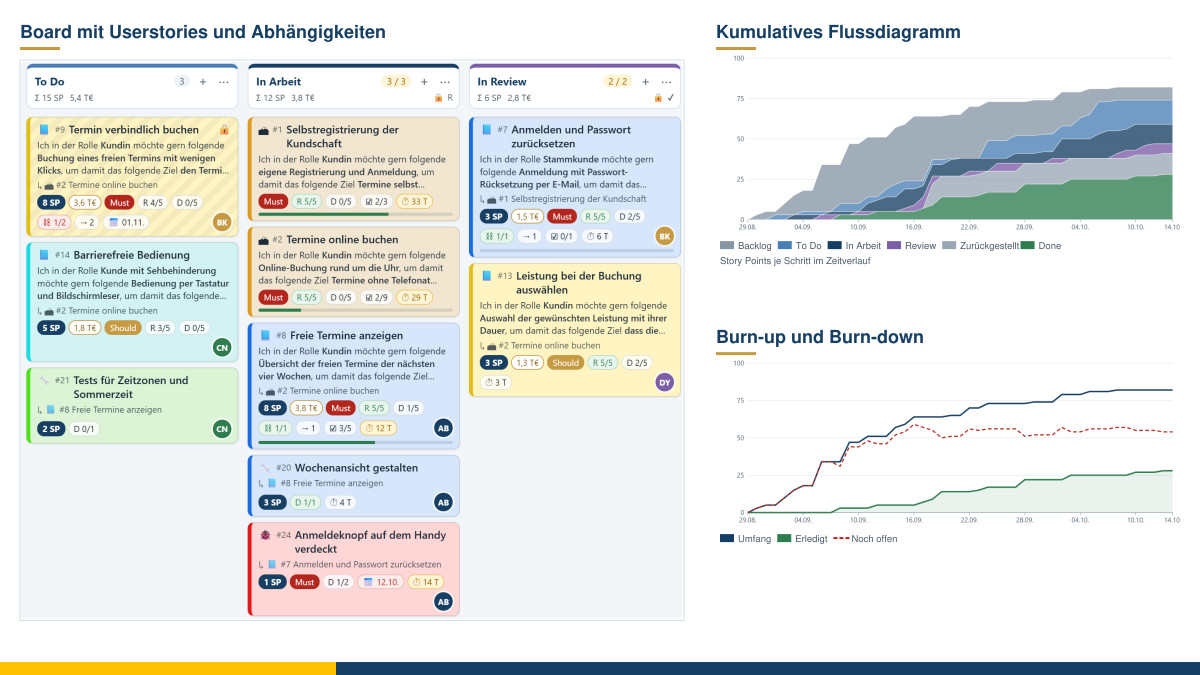
Anyone who works in a team knows the situation: tasks are hidden away in e-mails, heads and spreadsheets, a lot is “almost done”, and nobody knows exactly where things are getting stuck. Kanban starts at the simplest point: it makes work visible. Each task is a card, each work step a column – and the cards move from left to right, from the first idea to “done”. For teams, projects and your own work, I have built a Kanban board that runs in the browser, costs nothing and keeps your data on your computer.
At a glance
- Cards with user stories: role, function and goal form the user story sentence; plus acceptance criteria, colour, priority and due date.
- Assessment: in story points, in euros or both.
- Responsibility: choose people from the team or type in new ones.
- Dependencies: a card only moves forward once its predecessors are far enough along.
- Definition of Ready and Definition of Done criteria: on every card as a checklist.
- Tasks for user stories, user stories for epics.
- Design your steps freely: Idea log, Backlog, To Do, In progress, In review, On hold and Done are prepared; you can insert further steps wherever you like.
- Reports: key figures, flow diagram, burn-up and burn-down, throughput, lead times and more – also as PDF and CSV.
- Free and local: free of charge, free software, no registration, nothing is transmitted.
Cards: user stories, tasks and colours
A card describes a task. For requirements, I use the tried-and-tested user story format: “In the role of …, I would like the following …, in order to achieve the following goal ….” You enter role, function and goal separately; the card shows the full sentence. This keeps it visible for whom something is being created and why – the question of benefit does not get lost. Acceptance criteria record how you can tell that the implementation has succeeded.
You break down larger undertakings into levels: an epic groups several user stories, and a user story is broken down into tasks or has reported bugs assigned to it. A bar on the user story shows how many of its tasks are done. For ideas, there is the card type idea and a dedicated “Idea log” step – so good thoughts do not get lost, and the backlog still stays manageable.
Each card gets one of twelve colours. What a colour stands for is agreed in the team, for example yellow for customer requests, red for bugs and green for technical work. The meaning appears as a legend on the cards, in the filters and in the reports. You assign priority according to the widely used MoSCoW scheme: Must, Should, Could or Won’t.
Cards are assessed, as you choose, in story points, in euros or both. Story points estimate the effort by comparing the cards with one another; the amount can stand for costs, budget or business value – just as you agree in the team. The totals for each step are shown in the column header.
You choose who works on a card from the team list. If the person is not on it yet, simply type in their name; they are then added. In the “Team” area, you record role and capacity. If you maintain your people centrally in the master data tool, you can take them over into the team from there in a few clicks – provided you switch on the master data connection in the board.
Dependencies: first things first
Some tasks build on one another: online appointment booking can only be implemented sensibly once the login works. You enter such dependencies as predecessors – via a selection list with search or by clicking the predecessor card on the board. The board then enforces the rule: a dependent card can only be dragged to “In progress”, “In review” or “Done” once all its predecessors have reached at least “In review”. Until then, it carries a lock.
As soon as you pick up a card, the columns change colour: green means allowed, yellow allowed with a note, red blocked – each with the reason. If you wish, the board shows the dependencies as lines; it does not allow circular dependencies in the first place. For each column, you set whether it waits for the predecessors and whether it counts as “far enough”. If you insert your own “Test” step, for example, you also decide whether it already releases the successors.
Ready and Done: quality on every card
Many teams agree on when a task is ready to be implemented (Definition of Ready) and when it is really finished (Definition of Done). In the tool, both appear as a checklist on every card. New cards take over the criteria from a template that you adapt for your team; on each card, criteria can be added, reworded or deleted.
When a card is dragged to “In progress”, the board checks the ready criteria; when it is dragged to “Done”, the done criteria – depending on the setting, as a note with the option “Move anyway” or as a block. Small counters such as “R 4/5” and “D 2/5” show the status directly on the card.
Steps and WIP limits
The steps Idea log, Backlog, To Do, In progress, In review, On hold and Done are prepared. If you move the mouse between two column headers, a plus sign appears: there you insert a new step and name it straight away. Using each step's menu, you change its name, colour, type and rules, collapse it, move it or delete it. The cards of a deleted step move to a step of your choice. Column headers can also be rearranged with the mouse.
A core element of Kanban is the WIP limit (from “work in progress”): the maximum number of cards that may be in a step at the same time. It looks inconspicuous, but it is the real lever. The more that has been started at the same time, the longer each individual task takes – a relationship known from queueing theory as Little's Law. At the same time, the limit protects the people in the team from overload. When it is reached, the board warns or blocks, just as you have set it.
Swimlanes additionally structure the board by person, by user story or epic, by priority or by type. If you drag a card into a different lane, its assignment changes accordingly. Search and filters help when there are many cards, and a sortable list with CSV export gives you an overview.
Reports: how does the work flow?
The board remembers when a card entered which step. The reports are built from this – measured in number of cards, story points or euros, for a period of your choice and, if you wish, for an individual person:
- Key figures: open and completed work, average lead and cycle time, throughput per week, blocked and overdue cards, exceeded WIP limits.
- Cumulative flow diagram: shows, for each day, how much is in which step. If a band in the middle widens, work is piling up there.
- Burn-up and burn-down: scope, completed and open work over time, plus a simple projection of when today's scope would be completed at the pace so far.
- Throughput and velocity: completed cards or story points per calendar week.
- Lead and cycle times: for each completed card, with the line below which 85% of the cards fell – a solid basis for reliable commitments.
- Dwell time and flow efficiency: how long cards stay in each step and what proportion of the time was actually spent working.
- Further views: workload per person compared with capacity, age of cards in progress, progress of user stories and epics, bottleneck cards that hold others up, and the distribution by colour, type and priority.
All reports can be printed or saved as PDF, and the data can also be exported as CSV for Excel.
Data and notes
The board runs entirely in your browser; Chrome or Edge are recommended. It is saved as a file on your computer; in addition, the browser keeps the latest state and restores it the next time you open it. Nothing is transmitted to me or to anyone else. In a team, the file can be kept in a shared folder – however, the tool does not support several people editing at the same time. Every action can be undone with the large arrows at the top, and a history shows the latest changes. A completely fictitious example demonstrates all functions before you set up your own board. The tool is free of charge and available as free software under the GPL: Open the Kanban board.
Conclusion
A Kanban board is quickly set up – it becomes effective through clear agreements: what does “ready” mean, what does “done” mean, how much may run at the same time, and what has to come first? The tool makes these agreements visible, helps you keep to them and uses its reports to show where work is stalling. The decisive question remains whether the way of working serves the people in the team.
If you would like support for your project or your team along this path – whether traditional, agile or hybrid – you will find more under project support and coaching and team development. My article Effective IT project management in SMEs gives an overview of process models. Feel free to talk to me in a free initial consultation.
Sources: David J. Anderson: Kanban. Successful Evolutionary Change for Your Technology Business. Blue Hole Press, 2010. – Mike Cohn: User Stories Applied. For Agile Software Development. Addison-Wesley, 2004. – Ken Schwaber, Jeff Sutherland: The Scrum Guide. November 2020 (Definition of Done). – Daniel S. Vacanti: Actionable Agile Metrics for Predictability. 2015. – John D. C. Little: A Proof for the Queuing Formula L = λW. Operations Research 9 (1961). – Prioritisation according to MoSCoW (Dai Clegg, in the context of the DSDM method). The wording and templates in the tool are my own.
Thinking further
You can find more on this topic under resources and downloads – or talk to me directly in a free initial consultation.
Comments
Comments are published immediately with your name. Only the name, title, comment text and time are stored – see the privacy policy.
Loading comments …