
This article was created with the AI assistant Claude and published by Peter Hoenig.
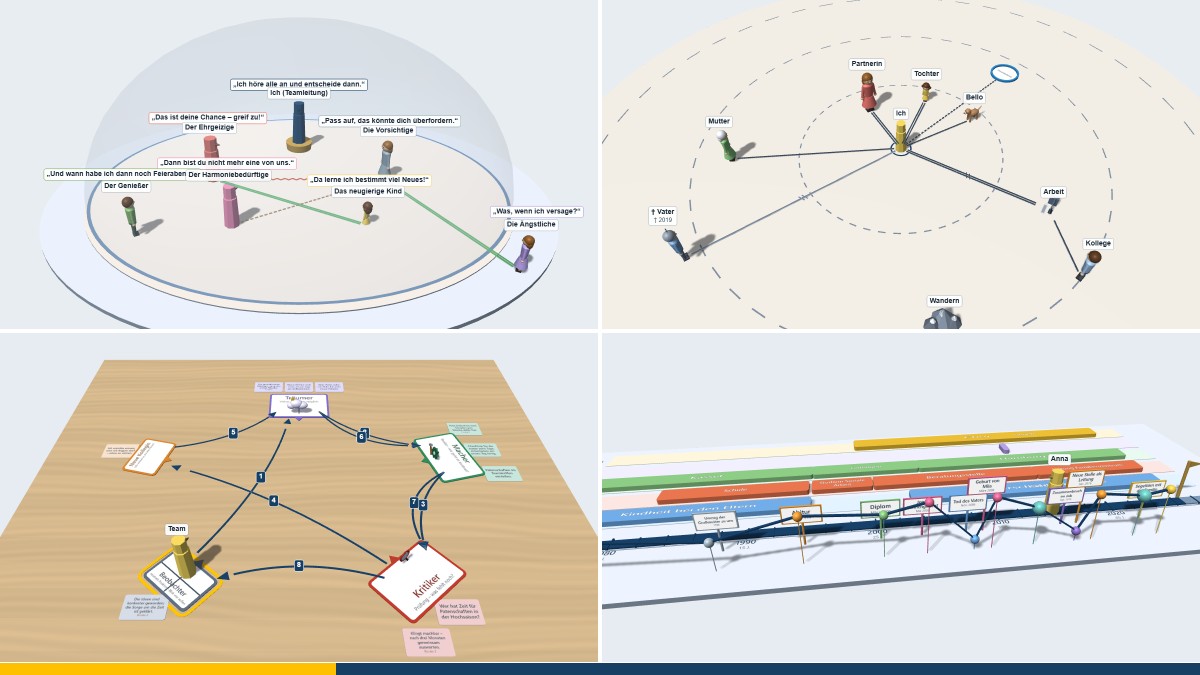
Many coaching methods thrive on space: figures are placed on a board, positions on the floor are stepped into, distances are changed. In a face-to-face session this is a matter of course. Over video, or when preparing at your desk, it is often missing. That is why my coaching tools are now also available in 3D: you can walk around the constellation, a figure goes from position to position – and above all, you can switch to the point of view of any figure.
At a glance
- Eight coaching methods are available as 3D tools; all of them run free of charge in your browser, without installation.
- The constellation can be rotated and viewed from above, from the front or from the side.
- From a figure's point of view, you see what it has in view – and what it does not.
- Several pictures, such as today and desired, merge into one another with animation and can be compared side by side.
- Files can be transferred between the 2D and 3D tools.
Why 3D?
The most powerful moment of a constellation is often the change of perspective: the client mentally steps into her colleague's place and suddenly realises that from there he can only see her back. On the flat board, you have to imagine this. In 3D, the camera moves to the figure's eye level – and you can see it. It is similar with floor anchors: if you work by video, you cannot walk through the room, but a figure can do it on your behalf, and the view from each position becomes visible.
The most important thing stays the same, though: the tools do not replace the conversation, they support it. What a constellation means is decided by the client – not by the program.
An overview of the tools
3D systemic board: set up families, teams and organisations with figures, people, animals and objects on a board made of wood, felt or paper; look from the point of view of each figure. Open the 3D systemic board · more on the systemic board
3D floor anchors: perceptual positions, drama triangle, tetralemma or timeline as sheets in the room; a figure walks them, and the path is recorded with arrows. Open the 3D floor anchors · more on floor anchors
3D Dreamer–Realist–Critic: Robert Dilts's three attitudes as places in the room, with rounds, note cards and the view from each position. Open the 3D Dreamer–Realist–Critic · more on the method
3D logical levels: Robert Dilts's six levels as a staircase that a figure climbs; cards stand on the steps like small display boards. Open the 3D logical levels · more on the logical levels
3D U process: the path through the U of Theory U as a landscape that leads down on the left and up on the right; the team stands where it currently is. Open the 3D U process · more on Theory U
3D social atom: “Me” in the centre, with people, animals, places and things in circles of closeness around it; viewed from the point of view of “Me”. Open the 3D social atom · more on the social atom
3D inner team: the inner voices as figures with speech bubbles under a translucent dome; the team leader stands on a pedestal, and those with more influence are larger. Open the 3D inner team · more on the inner team
3D lifeline: a walkable timeline with areas of life, events and an emotion curve; a figure walks through the years and looks back or ahead. Open the 3D lifeline · more on the lifeline
What all 3D tools have in common
- Figures and symbols: In addition to the elements of the respective method, well over a hundred figures and symbols are available – people in various postures, animals, plants, objects, feelings and values.
- Views: rotate and zoom freely, fixed views from above, front, left, right and behind, “Fit to view” at the click of a button.
- A figure's point of view: camera at eye level, with the field of vision drawn in if you wish.
- Pictures and comparison: several pictures in one file, animated transitions, two pictures side by side; if you wish, traces show the earlier position.
- Undo and redo using large arrows, automatic interim saving in the browser.
- Result: an image of the current view and a printable picture sheet with several views, which you can save as a PDF.
- Exchange with 2D: Every 3D tool opens the files of its 2D counterpart and, if you wish, saves back in its format. If you need presentations, Visio drawings or SVG, use the 2D tool for this.
Technology and data protection
Each 3D tool consists of a single file that runs in an up-to-date browser – without installation, without an account and without additional programs. The browser generates the 3D display itself; no libraries or content are loaded from the internet. All data stays on your computer: in the files you save and in the browser's storage. The tools are free of charge and available as free software under the GPL.
In coaching, the 3D tools serve as models for reflection and dialogue, not as diagnostic instruments. Coaching does not replace psychotherapy.
Conclusion
In 3D, a picture becomes a space – and a view from outside becomes a view from within. If you would like to experience how this works in coaching, whether face to face or by video, get in touch for a free initial consultation.
Notes: The Dreamer – Realist – Critic method is also known as the Walt Disney strategy; Disney is a registered trademark of Disney Enterprises, Inc., and there is no connection with the trademark owners.
Thinking further
You can find more on this topic under resources and downloads – or talk to me directly in a free initial consultation.
Comments
Comments are published immediately with your name. Only the name, title, comment text and time are stored – see the privacy policy.
Loading comments …