
This article was created with the AI assistant Claude and published by Peter Hoenig.
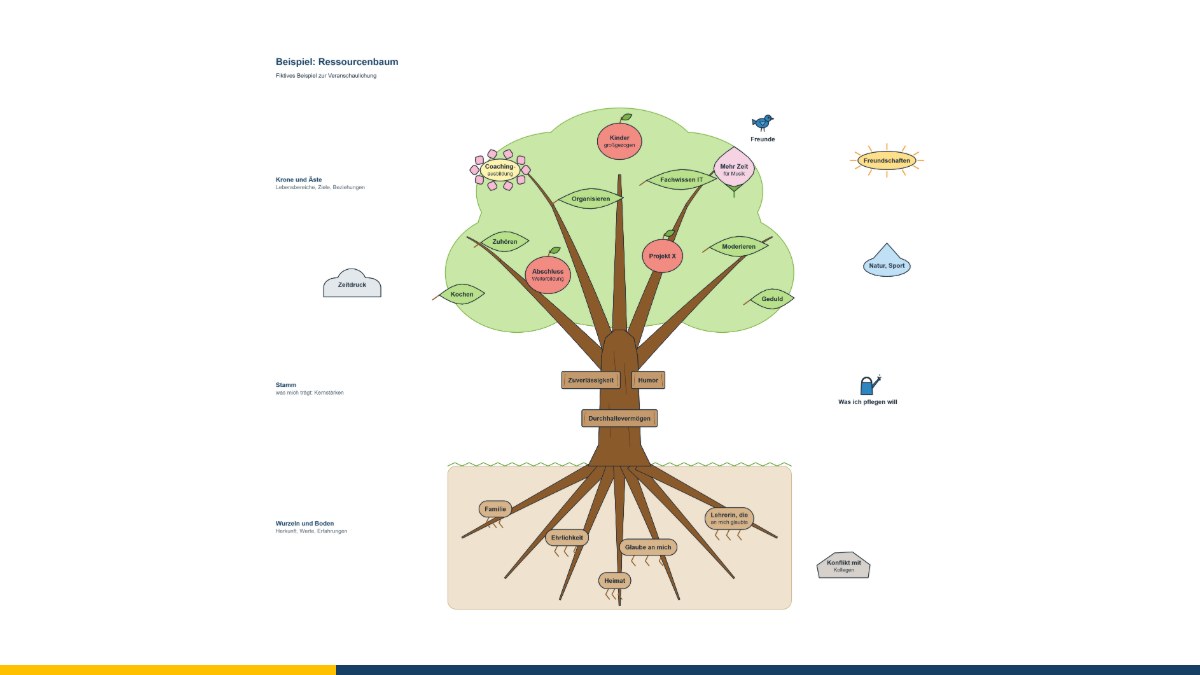
A tree needs roots to find a firm hold, a strong trunk to weather storms, and a crown in order to grow and bear fruit. The resource tree uses this image to put your own strengths into context: What sustains me? What can I do? In which direction do I want to grow?
At a glance
- The resource tree arranges origins and values (roots), abilities (trunk) and goals and successes (crown) in one picture.
- The tree is an ancient symbol of growth; the exercise is widely used in coaching, counselling and education.
- You decide for yourself what the areas stand for.
- With the free editor, the tree is created directly in your browser.
Aim of the method
The resource tree makes visible strengths that have become taken for granted in everyday life – and shows what they have grown out of. It is particularly suitable for career reorientation, before job applications, after crises or when someone feels they are not good at “anything special”. The finished picture is often encouraging: it shows how much is already there.
Where the method comes from
In many cultures the tree stands for life and growth – from the tree of life in myths and religions to the family tree. As an exercise, the resource tree belongs to the resource-oriented methods that take up Antonovsky's question of what keeps people healthy and able to act, and that have been used in therapy, counselling and adult education for decades. There is no fixed form and no single originator; the areas are interpreted differently depending on the concern.
How to create the resource tree
- Roots: What gives me a firm footing? Origins, values, important people, formative experiences.
- Trunk: What can I do? Abilities, knowledge, qualities I can rely on.
- Crown and branches: In which direction am I growing? Goals, interests, plans.
- Fruit: What have I achieved? Successes I am proud of.
- Surroundings: What nourishes the tree (sun, rain), what puts a strain on it (storm, stones)?
Then look at the tree together: What stands out? Which root gives particularly strong support? Which fruit would you like to harvest next?
Working with the editor
- Tree template: soil, roots, trunk and crown, adjustable in size and displayable in all four seasons. The labels of the areas can be changed freely.
- Elements you can label: leaf, fruit, blossom, bud, root, bark plate, drop, sunbeam, cloud, stone, sign and heart – the shape grows with the text.
- Symbols: coloured symbols as in the resource garden, plus others such as a nest or an axe, for sources of strength and burdens.
- Saving and export: Save as a file, export as PDF, PowerPoint, LibreOffice Impress, Visio, SVG and PNG.
The editor runs entirely in your browser and does not transmit any data. It is free of charge and available as free software under the GPL: Open the resource tree editor in your browser.
The resource tree serves as a model for reflection and dialogue, not as a diagnostic instrument. Coaching does not replace psychotherapy.
Conclusion
The resource tree shows what you can build on – and where you would like to grow. If you would like to create one in coaching, get in touch for a free initial consultation.
Source: Antonovsky, A. (1979): Health, Stress, and Coping. San Francisco: Jossey-Bass.
Thinking further
You can find more on this topic under resources and downloads – or talk to me directly in a free initial consultation.
Comments
Comments are published immediately with your name. Only the name, title, comment text and time are stored – see the privacy policy.
Loading comments …