
This article was created with the AI assistant Claude and published by Peter Hoenig.
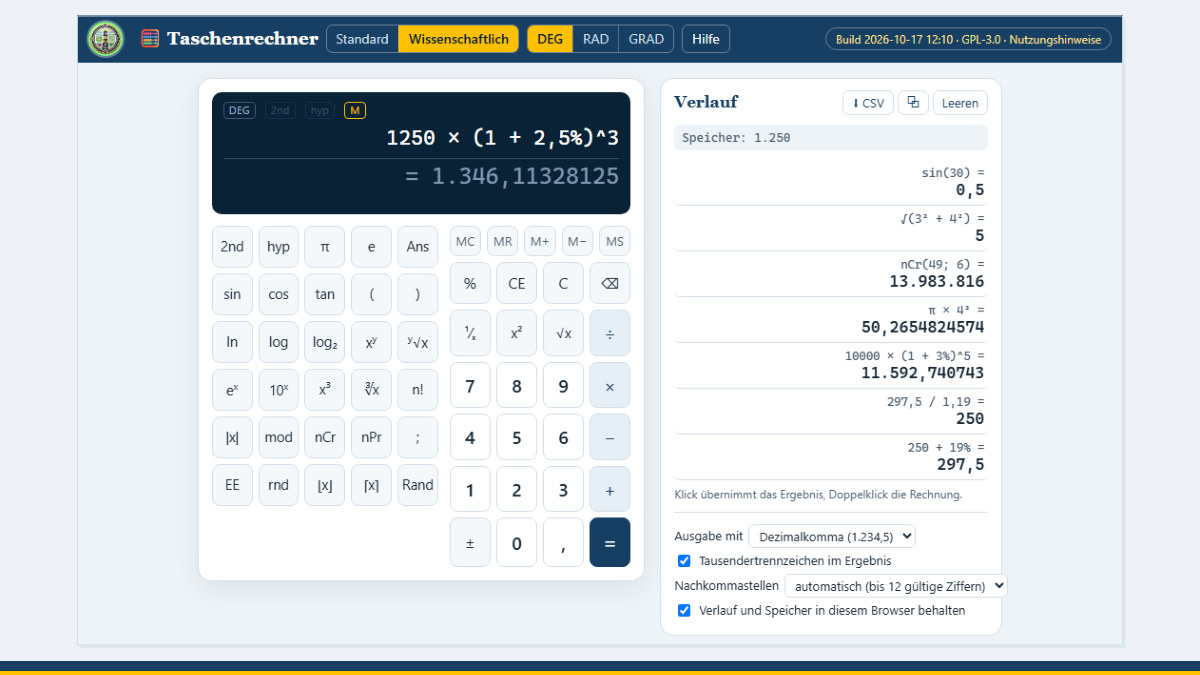
A calculator is one of those things you need all the time and rarely notice: quickly adding VAT, projecting an interest rate over several years, working out an area or checking how many combinations there are. The calculator that comes with Windows or your phone does the job – but you often have to copy down intermediate results, and the calculation from a moment ago has disappeared. That is why my tools now include a simple calculator with scientific functions that runs in the browser and remembers your calculations.
At a glance
- Calculate as on paper: type in whole calculations or enter them with the keys – with brackets, multiplication and division before addition and subtraction, and powers.
- Percentages as you would expect:
250 + 19%gives 297.5;250 − 19%gives 202.5. - Two views: “Standard” for everyday use, “Scientific” with trigonometric functions, logarithms, powers, roots, factorial and combinatorics.
- Degrees, radians or gradians: for sine, cosine, tangent and their inverse functions; plus the hyperbolic functions.
- Memory and history: MS, MR, M+ and M− as usual; the history shows the most recent calculations and can be saved as a table.
- Notation to match the language: in the English view, a decimal point and commas as thousands separators; in the German view, a decimal comma and full stops. You can switch at any time.
- Free and local: free of charge, free software, nothing is transmitted.
Calculating as on paper
You can type in a calculation in full – for example (12.5 + 7.5) × 3^2 – and calculate it with Enter. What you learned at school applies: brackets first, powers before multiplication and division, multiplication and division before addition and subtraction. A multiplication sign before a bracket or before π may be left out; the calculator understands 2π or 3(4 + 5). It shows the provisional result while you are still typing. If a bracket is missing or a character is in the wrong place, it tells you in words what is wrong instead of just showing “Error”.
If you prefer clicking, use the keys. The function keys act on the number before the cursor: first 9, then √x gives the square root of 9. After the equals sign, an operator continues the calculation with the result, while a new digit starts a new calculation. Ans always stands for the last result.
Percentages without detours
Many calculators handle percentages differently from what you might expect. Here, 250 + 19% adds 19% of 250, 250 − 19% subtracts it, 250 × 19% gives 19% of 250, and 19% on its own is 0.19. This also works in brackets, for example for compound interest over three years: 1250 × (1 + 2.5%)^3. Accounting and tax, however, have their own rounding rules – that is what the accounting tool is for.
The scientific functions
In scientific mode, the following are also available:
- Trigonometric functions sin, cos, tan – in degrees, radians or gradians, as you choose –, their inverse functions with the 2nd key and the hyperbolic functions with hyp,
- Logarithms to base e, 10 and 2 as well as to any base, plus eˣ and 10ˣ,
- Powers and roots: x², x³, xʸ, square roots, cube roots and roots of any degree,
- Factorial – for decimal numbers via the gamma function –, combinations (nCr) and permutations (nPr), for example the number of possible combinations in the 6-out-of-49 lottery:
nCr(49; 6), - Rounding, rounding down and up, absolute value, remainder of a division (mod), powers of ten (
6.02E23or1e3), the constants π and e, and a random number.
Calculations are carried out with the precision that computers normally use (about 15 to 16 significant digits). Up to twelve significant digits are displayed, so that small rounding residues such as with 0.1 + 0.2 do not get in the way. Whole numbers with up to 15 digits are shown in full.
History and memory
The history with the most recent calculations is on the right. A click inserts a result at the cursor position; a double-click brings back the whole calculation so that you can change it. Use the arrow keys to scroll through earlier calculations. You can copy the history or save it as a table (CSV), for example to continue working on a calculation in Excel. The memory works as on a desktop calculator, with MS, MR, M+, M− and MC.
Where the data is kept
The calculator runs entirely in your browser; nothing is transmitted to the internet, not even to me. History and memory are kept in your browser on your device so that they are still there after reloading. This can be switched off with a tick box in the settings; the history can be cleared at any time.
Conclusion
A small tool, but one you need often: calculations are entered legibly, percentages work as expected, and nothing gets lost. The calculator is free of charge and available as free software under the GPL: Open the calculator. If you would like to design your tools and processes as a whole so that they truly serve the people in your company, talk to me in a free initial consultation.
The calculator is an aid for everyday and technical calculations. It does not replace verified software for accounting, tax or safety-related calculations.
Thinking further
You can find more on this topic under resources and downloads – or talk to me directly in a free initial consultation.
Comments
Comments are published immediately with your name. Only the name, title, comment text and time are stored – see the privacy policy.
Loading comments …